Enjoy FREE SHIPPING on every order, fully insured for your peace of mind.
Description
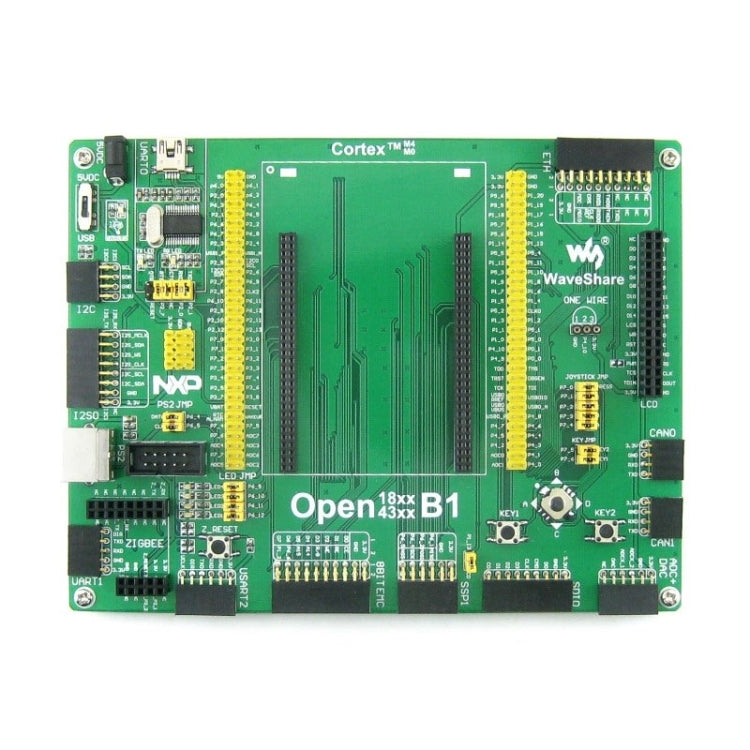
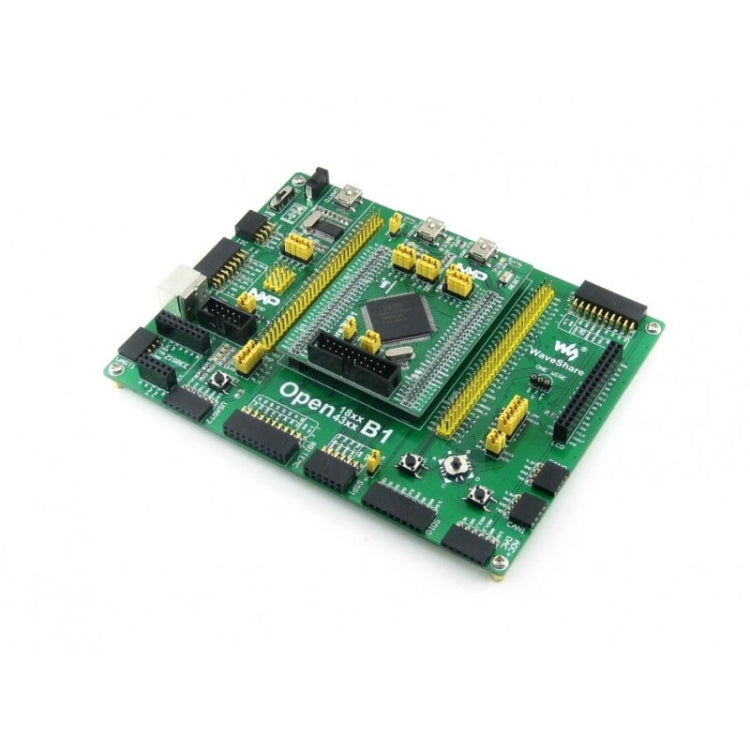
Open4337-C is an LPC development board designed for the LPC4337JBD144 microcontroller, consists of the mother board and the MCU core board Core4337.
The Open4337-C supports further expansion with various optional accessory boards for specific application. The modular and open design makes it the ideal for starting application development with NXP LPC series microcontrollers.
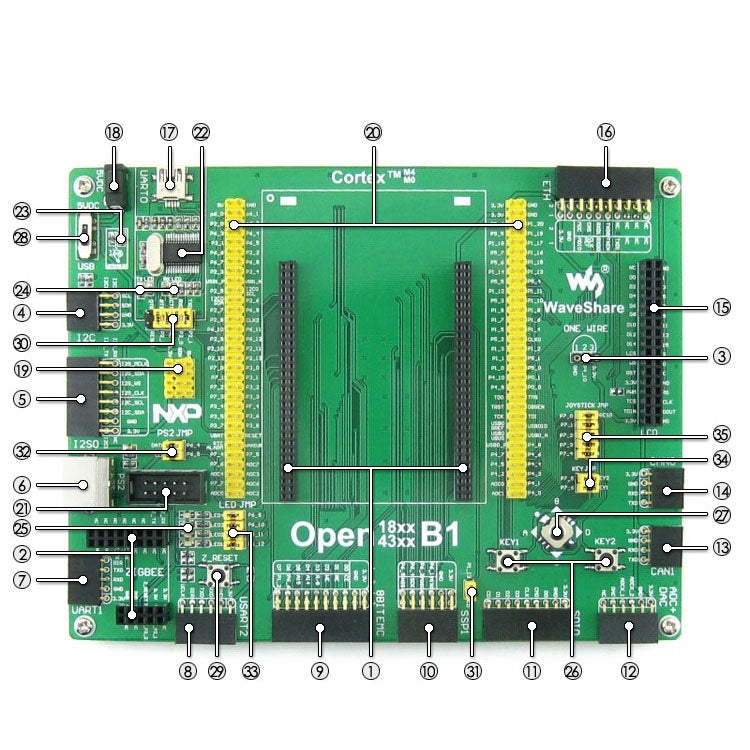
What is on the mother board
1. MCU core board connector: For easily connecting the MCU core board
2. ZigBee connector: For connecting ZigBee module
3. ONE-WIRE interface: Easily connects to ONE-WIRE devices (TO-92 package), such as temperature sensor (DS18B20), electronic registration number (DS2401), etc.
4. I2C0 | I2C1 interface: Easily connects to I2C peripherals such as I/O expander (PCF8574), EEPROM (AT24Cxx), etc.
5. I2S0 interface: For connecting I2S modules such as Audio module, etc.
6. PS/2 interface: Easily connects to PS/2 keyboard and/or mouse
7. UART1 interface: Easily connects to RS232, USB TO 232, etc.
8. UART2 interface: Easily connects to RS232, USB TO 232, etc.
9. 8 Bit EMC interface: For connecting NandFlash module, etc.
10. SSP1 interface: Easily connects to SPI peripherals such as DataFlash (AT45DBxx), SD card, MP3 module, etc.
11. SDIO interface: For connecting Micro SD module, features much faster access speed rather than SPI
12. ADC+DAC interface: For ADC/DAC testing
13. CAN1 interface: For connecting CAN module
14. CAN0 interface: For connecting CAN module
15. LCD interface: For connecting touch screen LCD
16. ETH interface: For connecting ETH module
17. USB interface: Converts to UART through an onboard USB to UART convertor PL2303
18. 5V DC jack
19. 5V/3.3 V power input/output: Usually used as power output, also common-grounding with other user board
20. MCU pins connector: All the I/O ports are accessible on expansion connectors for further expansion
21. ZigBee programming/debugging interface: For debugging ZigBee module
22. PL2303, onboard USB to UART convertor
23. Power indicator
24. PL2303 TX-LED / RX-LED, UART transmitting/receiving indicator
25. LEDs: Convenient for indicating I/O status and/or program running state
26. User key: Convenient for I/O input and/or interact with running code
27. Joystick: Five positions
28. Power supply switch, 5V DC or USB
29. ZigBee reset button
30. PL2303 jumper: Supports programming and/or UART debugging
31. SD card detect jumper: Enable SD card detection function
32. PS/2 jumper
33. LEDs jumper
34. User key jumper
35. Joystick jumper
What is on the Core4337
1. LPC4337JBD144: The LPC ARM Cortex-M4/M0 dual-core microcontroller:
- Core: Cortex-M4 processor, 204MHz Max
- Core: Cortex-M0 coprocessor, 204MHz Max
- Package: LQFP144
- I/Os: 83
- Memories: FLASH total 1M, SRAM total 136kB, ROM 64kB, E2PROM 16kB, OTP memory 64 bit
- Interfaces:
-- 1 x SPIFI, 1 x 10/100T MAC
-- 1 x High-speed USB2.0 Host/Device/OTG
-- 1 x High-speed USB 2.0 Host/Device
-- 1 x 550 UART, 3 x 550 USART, 1 x IrDA
-- 2 x CAN 2.0, 2 x SSP, 1 x SPI, 1 x Fast-mode Plus I2C
-- 1 x standard I2C-bus, 2 x I2S, 1 x EMC, 1 x SD/MMC
-- 1 x PWM, 1 x QEI, 1 x 10-bit DAC, 2 x 10-bit ADC
2. AMS1117-3.3 (on bottom side), 3.3V voltage regulator
3. LM3625-H (on bottom side), USB power management device
4. QSPI FLASH solder pads (on bottom side), for soldering external Flash if required
5. Power indicator
6. USB1 VBUS LED
7. USB0 VBUS LED
8. Reset button
9. 12M crystal oscillator
10. 32.768K crystal, for internal RTC with calibration
11. JTAG/SWD interface: for debugging/programming
12. USB1 interface:
- Device mode: communicating with computer
- Host mode: communicating with USB devices (such as USB Flash Drive) through an adapter cable
13. USB0 interface, features USB OTG function
14. MCU pins expander, VCC, GND and all the I/O ports are accessible on expansion connectors for further expansion
15. 5Vin power input, power the core board from external supply (while working on USB HOST/OTG mode, a 5V power input is required)
16. BOOT configuration
17. VBAT selection jumper
- Short the jumper to use system power supply
- Open the jumper to connect the VBAT to external power supply, such as battery
18. USB PWR OUT jumper
- Short the jumper: powered from USB1 VBUS (it's possible to provide power to the mother board via the 5V pin)
- Open the jumper: powered from the mother board
19. USB1 jumper
- Short the jumper when using USB1
- Open the jumper to disconnect from I/O port
20. USB0 jumper
- Short the jumper when using USB1
- Open the jumper to disconnect from I/O port
Package Contents
1. Open4337-C development board x 1
2. USB type A plug to mini-B plug cable x 1
3. 4-pin wire x 2
4. 2-pin wire x 2
5. USB power cable x 1
6. Software CD x 1
Cancellation Policy:
We at Order2india strive to provide you with the best possible experience while you shop with us online. Since our orders are shipped from overseas , we try to reduce the handling time as much as possible by quickly processing the orders , Hence any cancellation request , has to be placed within 24 hours of placing the order. The refund amount will be credited back on your original mode of Payment. .
Warranty:
All our products comes with a default 90 days seller replacement warranty against manufacturer defect as a service and reassurance to our customers. Order2india will take care of all logistics to and from the manufacturer/supplier for replacement . If within 90 days of delivery ,any problem is found with our product , please contact our customer support and we would replace it for you absolutely free.
Return Policy
Our return policy is outlined below. The policy reflects the reality that our products are sourced from suppliers located outside India and is formulated keeping in mind the costs and time involved in the logistics, both in the forward direction (i.e. shipping products to India from the suppliers) and reverse direction (i.e. shipping returned products back to the suppliers).Certain products are not eligible for return or refund as below
Return Process & Timeline
For eligible products, the policy is summarized below. Please note that Returns that do not meet the Return Process and Timeline below will not be eligible for a refund.
|
|
Allowed Time Line |
Return Process |
|
Due to Damage in transit |
Within 24 hours of Delivery |
Inspect package before taking Delivery and if damaged REJECT package and DO NOT take delivery from the courier and Send email to support@order2india.com within 24 hours of rejecting the delivery so we can process your refund. |
|
Dead on Arrival or mal-functioning product |
Within 15 days of Delivery |
Contact us or email us at support@order2india.com within 15 days of delivery with details of the problem. |
|
Incorrect Order (e.g. model, brand, color or size different from what was ordered) |
Within 15 days of Delivery |
Contact us or email us at support@order2india.com within 7 days of delivery with details of the problem. |
We process your payment information securely. We do not store credit card details nor do we have access to your credit card information.
If you receive a parcel with missing, incorrect, or secondary packing items, please contact us within 7 days of delivery with relevant proof. Order2india will assess the situation and provide resolution based on the extent of the damage.

You may also like
Recently viewed